CDCFIB Shortlisted Candidates 2026 for Physical Screening: Portal Login
 Ololade Blessing
If you sat the CDCFIB Computer-Based Test (CBT) for NSCDC, NIS, NCoS, or FFS recruitment, the physical screening shortlist is the next major milestone.
Here’s exactly how to check your status, log in, and what the screening exercise involves.
Join our WhatsApp channel for instant job alerts
Recruitment postings, shortlists and exam updates — sent straight to your WhatsApp, completely free.
Join the channelDisclaimer: CareerPulse is an independent recruitment and career information platform. We are not affiliated with, endorsed by, or acting on behalf of any government agency, recruiting body, or company mentioned on this channel. Always verify details directly with the official source before applying or making any payment.
Overview
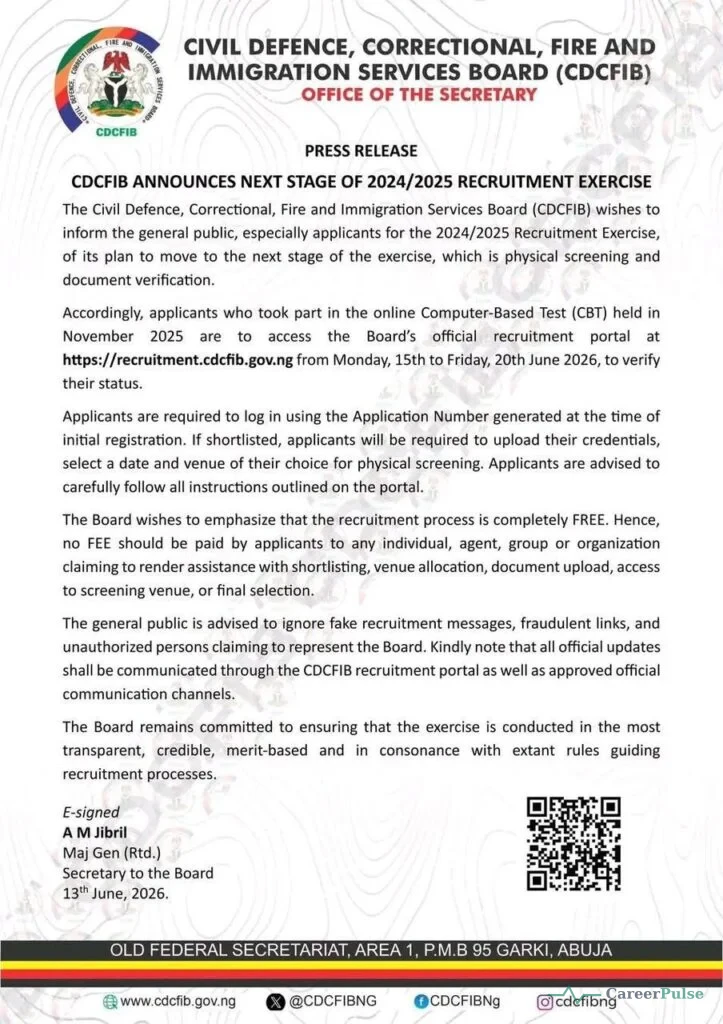
The Civil Defence, Correctional, Fire and Immigration Services Board (CDCFIB) directed all candidates who participated in the Computer-Based Test (CBT) held in November 2025 to log on to the official recruitment portal between Monday, 15 June and Friday, 20 June 2026, to confirm their shortlist status for physical screening.
The announcement was made in a statement signed by the Board’s Secretary, Major General A. M. Jibril (Rtd.).
About CDCFIB
CDCFIB was established by the Federal Government of Nigeria to oversee recruitment into the Nigeria Security and Civil Defence Corps (NSCDC), Nigeria Immigration Service (NIS), Federal Fire Service (FFS), and Nigerian Correctional Service (NCoS), managing the entire process from application through shortlisting, physical screening, and final appointment.
Step-by-Step: How to Check Your Physical Screening Shortlist Status
- Open your browser and go to the official portal at recruitment.cdcfib.gov.ng.
- Log in using your Application Number, National Identification Number (NIN), or the phone number you used during initial registration.
- A dialogue box will appear indicating whether you’ve been shortlisted for physical screening.
- If shortlisted, your screening date, venue, and time details will be displayed on your dashboard.
- Download your CDCFIB shortlist PDF or Invitation Letter (where provided), print it, and follow all instructions listed exactly.
What Happens If You’re Shortlisted
Shortlisted candidates are required to:
- Upload original copies of all required documents/certifications for verification
- Select their preferred screening date, time, and venue from the available options, choose carefully, as changes may not be permitted after confirmation
- Download and print their screening invitation slip once verification and scheduling are complete
Physical Screening Details
| Detail | Information |
|---|---|
| Verification Window | Monday, 15 June to Friday/Saturday, 20 June 2026 (dates reported vary slightly by source) |
| Physical Screening Start | Reported as commencing around 22 June 2026 |
| Screening Location | Designated centres nationwide, typically State Command Headquarters, across all 36 states and the FCT |
| What It Covers | Physical fitness checks and document verification |
Documents to Bring to Screening
- Original copies and photocopies of all credentials, neatly arranged in flat files
- Your printed screening invitation slip
- Valid means of identification matching your application details
- Educational certificates relevant to your applied cadre
Selection Process
The Board has stated that shortlisting for physical screening followed Federal Character principles, meaning not everyone who performed well on the CBT was automatically selected, since states and services have quotas that must be respected. As a result, the number of shortlisted candidates can vary significantly by state, depending on each service’s specific needs.
Common Mistakes Applicants Make
- Missing the verification window entirely by not checking the portal within the stated dates
- Selecting a screening date they’re not certain they can attend, since changes may not be allowed afterward
- Arriving without both original documents and photocopies
- Trusting unofficial sources for portal links instead of going directly to recruitment.cdcfib.gov.ng
Expert Tips for Success
- Log in as early as possible within the verification window rather than waiting until the last day.
- Choose your screening date and venue carefully, since this selection may be final once confirmed.
- Prepare your physical fitness ahead of the screening, since this stage includes genuine fitness checks.
- Keep checking the portal’s news/update section for any venue or time changes specific to your centre.
Recruitment Scam Warning
The CDCFIB has explicitly and repeatedly emphasized that the entire recruitment process, including shortlisting and physical screening, is completely free of charge. No fee should ever be paid to any individual, agent, group, or organization claiming to assist with shortlisting, venue allocation, document upload, screening venue access, or final selection. Report any such request and rely only on the official portal for updates.
Important Dates and Deadlines
The status verification window was reported as running from 15 June to 20 June 2026, with physical screening reported to begin around 22 June 2026. Because exact dates have varied slightly between sources, confirm your specific screening date directly on your CDCFIB dashboard.
Frequently Asked Questions
How do I check if I’ve been shortlisted for CDCFIB physical screening?
Log in to recruitment.cdcfib.gov.ng using your Application Number, NIN, or phone number to see your status.
Can I change my screening date after selecting it?
Changes may not be permitted after confirmation, so choose a date you’re certain you can attend.
Why do some states have more shortlisted candidates than others?
The Board has stated that shortlisting follows Federal Character principles, with quotas varying by state and service need.
Is the CDCFIB physical screening process free?
Yes, explicitly confirmed as free at every stage by the Board.
What happens after physical screening?
Candidates typically proceed to further vetting and, for successful applicants, final selection and training enrollment.
Conclusion
Checking your CDCFIB physical screening status comes down to logging in during the correct window and selecting your screening details carefully, since some choices may be final. Bookmark this page, and best of luck at your screening.
